
The best Padlet alternative depends on the activity: choose Wakelet for curated collections and student portfolios, Canva Whiteboards for visual lessons, FigJam for live brainstorming, Microsoft Whiteboard for schools already using Microsoft 365, or Miro for advanced project mapping. Padlet remains a strong classroom tool, but these five options may fit a specific workflow, school ecosystem, or budget better.
Why teachers look for Padlet alternatives
Padlet combines visual boards with Sandbox, its collaborative canvas. Teachers often explore alternatives when they need a different free-plan limit, deeper integration with an existing school system, more structured student portfolios, specialized design tools, or a simpler whiteboard experience.
Padlet’s official help center states that after June 30, 2026, free accounts are limited to three total Sandboxes or boards, and a free Sandbox can contain up to 20 cards. That may be sufficient for occasional use, but a teacher running several classes or long-term projects may need another workflow. Always review current plan details before moving student work.
- Do not choose by feature count alone; start with the exact student task.
- Confirm age requirements, school approval, privacy controls, and account setup.
- Test sharing permissions with a student-view account before class.
The five best Padlet alternatives at a glance
The table below compares each tool by its strongest classroom use. Free and education access can require verification, and plan limits can change.
| Tool | Best classroom use | Main strength | Important consideration |
|---|---|---|---|
| Wakelet | Resource collections and student portfolios | Organized multimedia collections with contribution permissions | Classroom workspace features depend on the selected plan |
| Canva Whiteboards | Visual lessons and creative brainstorming | Whiteboards connect with Canva’s wider design suite | Canva Education eligibility and teacher invitations apply |
| FigJam | Live discussion, diagrams, and group brainstorming | Sticky notes, stamps, voting, comments, and real-time participation | The open canvas can require clear roles and boundaries |
| Microsoft Whiteboard | Brainstorming inside a Microsoft 365 school | Works naturally with Microsoft Teams and Microsoft accounts | Most useful when the school already manages Microsoft 365 |
| Miro | Complex maps, project planning, and older-student teamwork | Powerful visual workspace with templates and facilitation tools | Education access requires an application and has eligibility limits |
1. Wakelet: best for collections and portfolios
Wakelet is a strong alternative when the classroom task is to collect and organize links, text, images, videos, and student contributions in one themed space. A teacher can share a collection and control whether students may view, add, or edit content. This makes Wakelet useful for research collections, reading responses, field-trip resources, and digital portfolios.
Choose Wakelet over a blank whiteboard when organization matters more than free-form drawing. A practical example is a class author study: each group adds a book review, a quotation, an illustration, and a source link to one shared collection.
- Best for: curated evidence of learning.
- Realistic setup time: 10–20 minutes for the first collection and sharing test.
- Common mistake: giving full edit access when students only need permission to add their own content.
2. Canva Whiteboards: best for visual lessons
Canva Whiteboards suits teachers who want brainstorming to connect with polished posters, presentations, videos, and other visual materials. Students can add ideas to a large canvas and move from rough thinking to a designed final product without switching platforms.
It is especially useful for story mapping, vocabulary sorting, mood boards, group planning, and visual exit tickets. Canva says its Education offering is free for eligible K–12 teachers and students, with students joining through a teacher or qualified institution.
- Best for: moving from brainstorm to finished design.
- Realistic setup time: 10–15 minutes when a template is prepared.
- Common mistake: offering too many decorative options before students have organized their ideas.
3. FigJam: best for live brainstorming
FigJam is Figma’s online whiteboard and is built for fast, visible participation. Its official education page highlights sticky notes, stamps, images, videos, voting, comments, audio chat, and cursor chat. Those features work well for affinity mapping, discussion protocols, peer feedback, and small-group planning.
Choose FigJam when students need to see ideas move, cluster, and change in real time. For example, groups can sort evidence into claim categories, vote on the strongest examples, and then explain the final arrangement.
- Best for: synchronous group thinking.
- Realistic setup time: about 10 minutes with a pre-labeled frame for each group.
- Common mistake: putting the entire class on one unstructured canvas; create group zones first.
4. Microsoft Whiteboard: best for Microsoft 365 schools
Microsoft Whiteboard is the most natural choice when students already work in Microsoft Teams and use school-managed Microsoft accounts. It supports brainstorming, project planning, problem solving, sticky notes, text, templates, and collaborative canvas work.
Microsoft states that Whiteboard is available to students and education professionals as part of the Microsoft 365 A1 offer. The main advantage is not novelty—it is reducing extra logins and keeping the activity inside an ecosystem the school already administers.
- Best for: Teams-based classes and school-managed accounts.
- Realistic setup time: 5–10 minutes when accounts are already configured.
- Common mistake: assuming every participant can edit; verify tenant and sharing settings before class.
5. Miro: best for advanced project mapping
Miro is a flexible visual workspace suited to older students, long-term projects, systems maps, research planning, design thinking, and detailed group workflows. Its Education plan includes private boards, templates, voting, a timer, and high-resolution export for eligible institutions.
Miro’s official documentation says educators and students at qualifying educational institutions can apply for a free Education plan. The application and team-size limits make it less immediate than a basic board tool, but the extra structure can be valuable for a semester project.
- Best for: complex projects with several stages.
- Realistic setup time: 20–30 minutes for a carefully structured first board, after account approval.
- Common mistake: using an advanced workspace for a one-question exit ticket that a simpler tool could handle.
How to choose the right alternative
Choose Wakelet when students are collecting and presenting resources. Choose Canva Whiteboards when brainstorming should become a polished visual product. Choose FigJam for energetic live participation. Choose Microsoft Whiteboard when Teams is already the classroom hub. Choose Miro for advanced planning and mapping with older students.
Run a five-minute pilot before a full-class launch. Check how students enter, what they can edit, whether names are visible, how work is exported, and what happens when two students select the same item. A simpler tool that everyone can access is usually better than a feature-rich tool that consumes the lesson with login problems.
An offline alternative for collaborative work
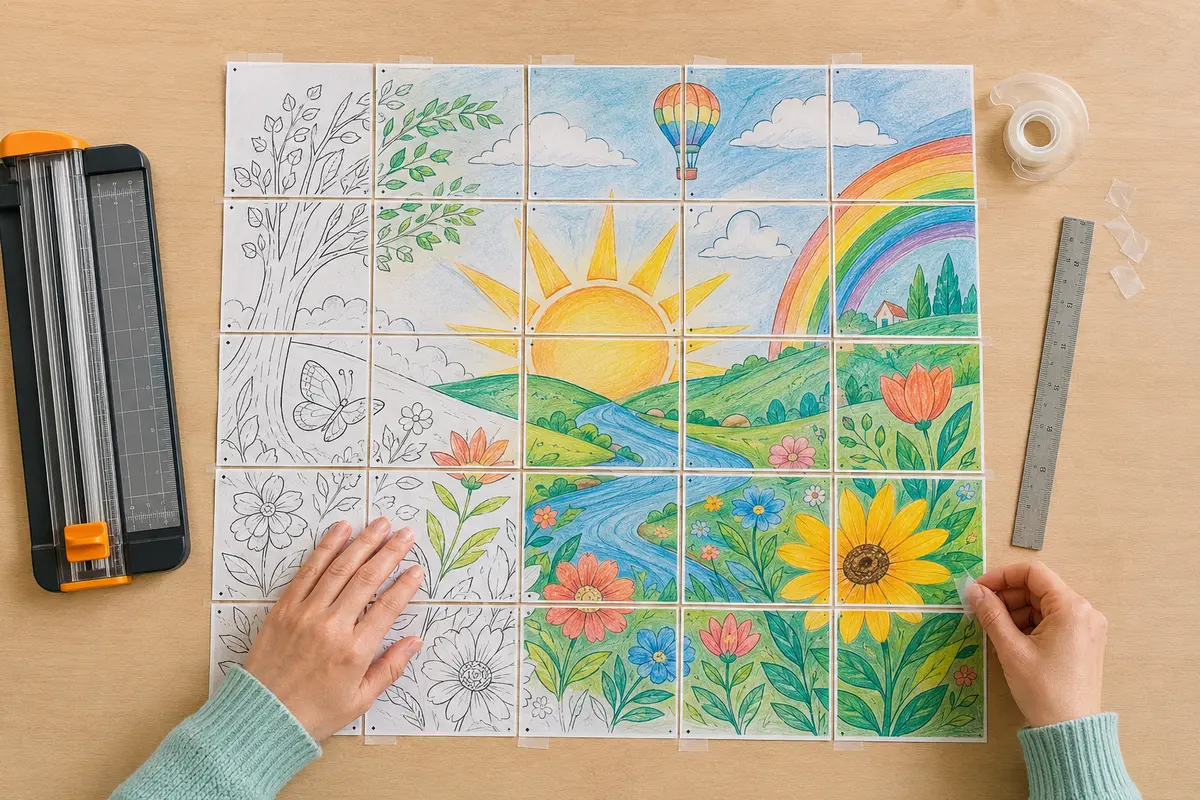
Not every collaborative activity needs another student account. For a device-free option, give each student one piece of a printable collaborative poster and assemble the pages into a shared class display. This works well when the goal is belonging, creativity, calm participation, or bulletin-board decor rather than digital discussion.
A hybrid lesson can use a digital board for planning and a paper poster for the final shared artwork. Students might collect theme words online, color individual pages offline, and upload a photograph of the assembled mural as the final reflection.
Frequently asked questions
What is the closest free Padlet alternative? There is no exact replacement: FigJam and Canva Whiteboards are closest for a free-form canvas, while Wakelet is closer for organized multimedia collections. Which alternative is easiest for Microsoft schools? Microsoft Whiteboard usually creates the least friction when accounts and Teams are already managed. Which is best for elementary students? A teacher-prepared Canva Whiteboard or FigJam frame can work, but account rules and supervision matter; a printable activity avoids logins entirely. Can teachers still use Padlet? Yes. The alternatives are useful when another tool better matches the task, access model, or school ecosystem.
Sources and official resources
Features, access rules, and plan limits were checked against the official resources below. They may change, so confirm the latest details before choosing a classroom platform.
Ready to create together?
Choose a printable, give every student a piece, and watch the big picture come to life.
Try a free collaborative poster activity ↗